Turn materials into possibilities
Choose a recipe, fill its pattern, and watch your materials become something useful.
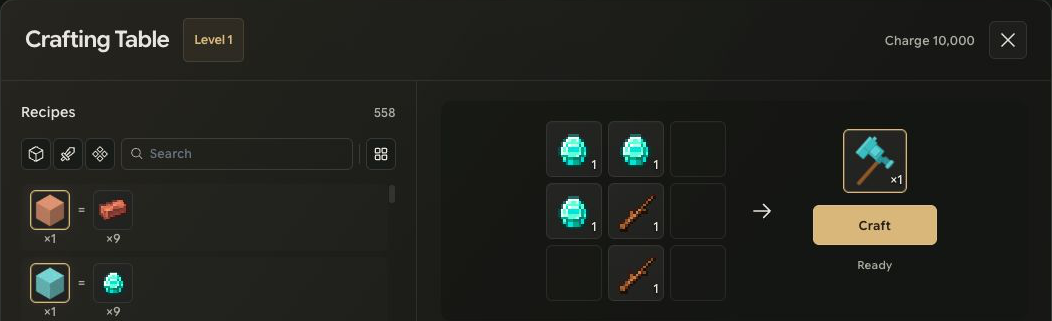
Choose what to make
Open a compatible facility. Filter recipes by block, equipment or material, search by name, and switch between a compact grid and a detailed list.
Click a recipe to add materials for one more craft. Shift-click adds ten to the material target. The target is capped at 99 crafts. Available materials move into the input slots; unavailable materials appear as red requirements. A shortage shows owned/required, such as 2/6. A satisfied requirement shows only the count, such as 6.
Read the preview
The preview is calculated from the actual input arrangement. A shaped recipe can be shifted within the crafting grid while keeping its shape. Empty space inside a pattern still matters.
The preview is not a finished item or an inventory slot. You cannot drag it away or put items into it. Moving materials manually clears the recipe selection so the actual arrangement determines the next preview.
Craft what the inputs allow
Select Craft to make up to the maximum supported by the current materials, capped at 99 crafts. A recipe can produce more than one item per craft, so the output item count can differ from the craft count.
Crafting proceeds one step at a time, with a 500 ms interval between completed steps. Progress and status appear without shifting the workspace. Other workspace interactions are blocked while crafting; Stop cancels the remaining sequence after any in-flight step finishes.
The sequence can stop for insufficient materials, charge, inventory capacity or another rejected requirement. Completed steps stay completed. Stopping does not undo the items already made.
Keep your remaining materials
Double-click a facility input to return it to the inventory. Compatible stacks fill before another slot is needed. Right-click splits a stack; it does not return the entire stack. Distribution stays within the input area or the inventory area where it started.
If the inventory cannot accept leftovers, they remain accounted for in facility storage. Mailbox-based recovery is a policy for paths that support it, not a promise that every close action creates mail. Timed jobs and Web3 conversion are separate from this instant crafting flow.